Showing posts with label hardware. Show all posts

Tuesday, February 21, 2023

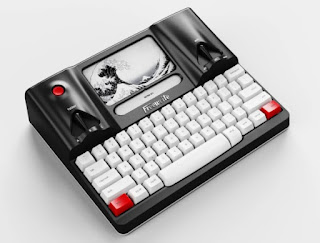
Freewrite Smart Typewriter

https://getfreewrite.com/products/freewrite-smart-typewriter-3rd-gen

Well, thanks to this device, my five-year bout of writer's block is ending. I can't credit this device entirely, but I can report what I found.

Modern spell and grammar checkers were killing my flow.

These "helpful" tools were also making my writer's block worse.

When I went to a device that did not have spell or grammar checking, all of a sudden, I returned to the muse. My flow had returned. My voice. One I had not heard for five years.

The tools I depended on to help me write were nagging and pestering me so much I stopped writing. They destroyed my confidence. They caused me to stop-start and stop-start endlessly. For every word I wrote, I had to go backward with every idea I wrote to the page.

To be honest, I can write with these tools, and I am doing it now.

But to have a case of writer's block, and to be nagged and pestered with every word you write, destroys the little confidence you are trying to nurture. The writer's muse, when it is coming back, is a fragile seedling. Abuse it, and it will never grow into the tree under which we seek shade and comfort.

I will do grammar and spell-checking later.

Let me write.

Let the tree grow.

Friday, April 16, 2021

2020 Macbook Air: Setup

So I have a new M1 MacBook Air as my writing machine, and I am setting this up to be both a mobile solution along with a comfortable base station hooked to a 4K monitor.

Why the Air and not the Pro? Honestly, the low front bezel and typing comfort, plus the silent operation. I know the pro has brightness, but I don't even set the air up to maximum so what I have is fine. The weight is about the same, but the Air feels much more portable and usable when I begin to travel again.

Especially if I have to take more than one laptop on a trip, I want light. If I want to take my work on the road, this is the way to go.


Software

I was trying MS Word, and that has a lot of nice grammar-checking features built-in, but Scrivener is my first and only love. If I need to grammar check, copy and paste into Word as a final proofread step.

Scrivener is pure organizational and writing love. I can seamlessly break a chapter into sub-chapters, set a word target for each, jump to any part of my story quickly, and fluff backwards as I write forward. I do like writing that way, focusing on the core story and action in my leading-edge parts, and then going back and adding detail, sensory information, and atmosphere later as I revise and review.

I can take notes as I go too in a dedicated notes area of the document, which is beautiful.


The Right Keyboard

So problem number one, a keyboard for the home station. I chose the Macally Backlit Mechanical Keyboard for Mac since it meets my requirements:

  • Mechanical keyboard
  • Mac interface
  • Clean design
  • Backlit

Why do a mechanical? I have a dedicated writing room, so no one is being bothered by the noise. And I love the noise of typing and the click-clack of keys. It is just such a primal, beautiful noise which makes me addicted to being creative and expressing myself in words.


If I can hear myself think when I type then I am suffering in silence. The sounds of keys clacking away is both therapeutic and nightly enjoyable to me, much like being given bubble-wrap and it is my job to sit there and pop it all day. And I can fly on a mechanical keyboard. My all-time record for word-count is 20,000 words in a day on a all day key banger, and that was on a mechanical gaming keyboard that I loved.

Mechanical keyboards and me? A match made in writer's heaven.


Connecting a Monitor

Problem number two, the giant 4K monitor. With a standard USB-3 hub, those do 4K at 30hz, which gives me interlacing and just an not-great experience. Not for this much money and this nice a monitor. I was worried that the Air could not do 60hz, but according to the Apple site it can.

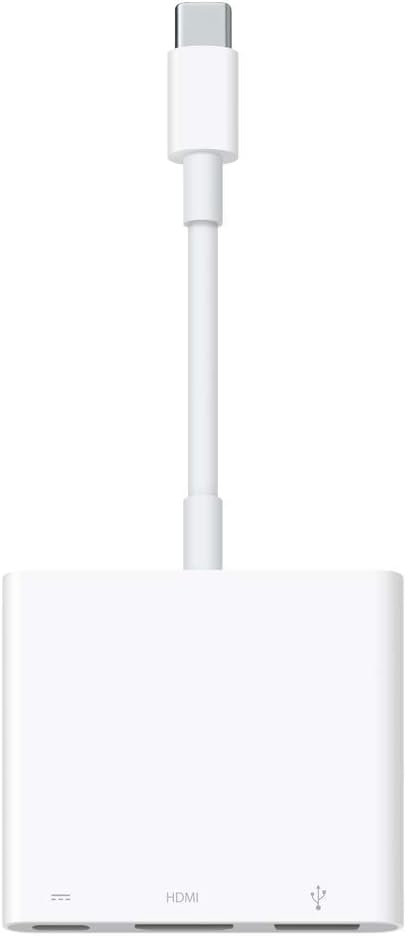
https://www.apple.com/shop/product/MUF82AM/A/usb-c-digital-av-multiport-adapter

I was just using the wrong cable and connector. So I got the Apple USB-C Digital AV Multiport Adapter which says this is possible, but only using an adapter like this:

3840x2160 at 60Hz on:

iPad Pro 11-inch, iPad Pro 12.9-inch (3rd generation and later), MacBook Pro (16-inch, 2019), MacBook Pro (15-inch, 2017 and later), MacBook Pro (13-inch, four Thunderbolt 3 ports, 2020), MacBook Air (2020), iMac (Retina 5K, 27-inch, 2017 and later), iMac (Retina 4K, 21.5-inch, 2017 and later), and iMacPro (2018)

So I can get 4K at 60hz. I am getting a 4K monitor HDMI cable as well so that should not be a bottleneck.


Other Connections

The 4K monitor has a USB connector, so that is going to plug into the single USB connection on the A/V adapter, and from there I can connect the keyboard and mouse. Power goes in the adapter's USB-C slot. I do have a hub in case I need more connections, but I want to keep cable-light on the desk.


The Final Outcome?

The keyboard? Nice, but not height adjustable and had to put a low book under it (I spilled water and the book got wet, ugh). With a lower desk or keyboard drawer it would be fine, so I am not returning it. I know, pay that much and get what you want, but I have other desks this would be perfect at and it may end up there instead of on a tabletop where the angle isn't right for my hands. This is made for sliding keyboard drawers at a lower height. The book is fine for now and it does not affect stability or my typing at all. In fact I would rather put something under it rather than have legs with only one height, so only one star off.

The adapter for 60hz? Works great and my 30hz refresh rate issue and the interlacing is gone. Thank you full 60hz! The USB connector goes to the monitor and fans out the keyboard and mouse, though I would like a standalone trackpad instead.

The 43" 4K monitor I use is beautiful, just stunning and fun to work on. I have to scale it right, but my work floats in a window and I can jump all around to different apps in their own places. It makes a world of difference between typing full-screen and in my own little place. I love having a window with my work in it, and a giant free place to open up reference, browsers, music players, or any other app without overlapping.

I am doing 6,000 words on a full day's work, so the setup is working great for me. More as I finish this up and get myself primed and ready for some serious writing work.

Friday, May 5, 2017

ASUS Chromebook Flip C302CA

There is something about a difficult choice that makes me want to buy, you know? If I had only one choice, like only the Samsung Chromebook Plus, this would be simple: I would wait. I have been waiting, great Chromebooks have come and gone, but now there feels like some real race here between these two equally capable machines and my mind is asking that question: which one would be right for me?

Now, I get a lot of use out of my old Samsung Chromebook 2, and I love the 11.6" form factor. The screen is not great on this machine, and upgrading to a full HD screen would make writing a lot more enjoyable. Jumping to a 12.5" form factor would not be too hard for me in portability, and I am used to typing on smaller keyboards so the narrow-ish and tiny-backspace keyboard of the Chromebook Plus is something I could get used to.

So why the ASUS now? An excellent trackpad, Intel chip, and backlit keyboard are the number one features here. Sure, the tablet mode on the Samsung is superior, it has a stylus, the screen is a 4:3 2400 by 1600 beauty, and the brightness is 100 nits higher - but if I want something for writing my heart says go with the ASUS.

Maybe.
On the Samsung, a 4:3 screen would let me see more of a document vertically than a 16:9. The keyboard though, even though I am used to smaller keyboards, my speed on normal ones is very high. This is more like a better tablet replacement, while the ASUS feels like a better laptop replacement. Since I am happy with my Fire HD 10 and I don't want to buy a replacement for something I am happy with, I may go for the laptop replacement.

But the bigger issue, if either of these were out all by its lonesome, I feel my pressure to buy would not be as high. There is something about a good horse-race that gets me all excited.

Or I could keep going on with what I got for another year and same all the thought and money.

My current state of mind? Leaning towards the ASUS strongly.

I am a writer first.

Friday, April 28, 2017

Screen Fatigue and E-Book Sales

“For consumers travelling or on holiday having an additional ereader device to look after is awkward...”
https://www.theguardian.com/books/2017/apr/27/screen-fatigue-sees-uk-ebook-sales-plunge-17-as-readers-return-to-print

Have we reached a point of device fatigue? I have seen a lot of reviews of the following device saying people are using it to replace their laptops, tablets, and e-readers with an all-in-one, like the Samsung Chromebook Plus:
This is also my current dream machine and I have this hope it replaces a Kindle Fire, e-reader, Windows machine, and Mac laptop. I would love to get down to two devices, phone plus laptop/tablet thingy. People say they are ditching every device and just sticking to a phone and a couple paperbacks - and I do not blame them. I tried the Windows Surface 3 thing, and while I do not doubt some do well with this, it has proven to be one of my nightmare devices:
Desktop dialog boxes sit behind the tablet mode interface, waiting for a reply and staying hidden forever. The keyboard and trackpad sometimes are not recognized. The machine asks me if I want to switch modes even though I have not disconnected the keyboard. Wireless problems requiring reinstalls of drivers and resets of the router. The keyboard itself feeling like typing on a sheet of cardboard. The inability to balance this on your lap or one leg. The SD card never staying mounted and having to always reinsert it to have the device pick it up. The slow SSD takes forever to run an update, and the list goes on and on. It feels like less of a tablet and more of a budget laptop with an optional keyboard accessory.

And they says 99-cent paperbacks are making a comeback, and I don't blame them. I still reach for physical books on a regular basis. I can take them anywhere and I don't have to worry about power, and they aren't really painful if they are lost or stolen. I can lend them to others. There is that tactful turning the page feeling that I grew up with, and I love the sensations - the smell of the ink, the feel of the paper, the sensation of weight, the bend of the spine, and the sound of turning a page.

I like e-readers and I like e-books. I like tablets. There is a huge convenience factor with e-books. A world of reading opens up to me, and I can sample so many new and varied writers it blows my mind. I can keep a library on my phone and I always have a library in my pocket.

But, I have device fatigue. My phone chirps at me for attention. My e-reader and tablet need charging and they are dependent on wall sockets like a junkie to a fix. Windows is a constant attention hog and I have to pretend I am a network security engineer to keep the thing safe while I am online, and stay abreast of security updates, hacks, and all sorts of intrusion news. My Mac is a little better, but it is an expensive beast that I worry about whenever it goes on the road with me.

And then I found this device a while back, a Samsung Chromebook 2:
Love at first sight. A replacement for my old EeePC in a 11" format, light, secure, cheap, and fast. Power that lasts nearly all day. The screen sucks but everything else is wonderful. A compact but nice keyboard and a trackpad that rivals my Mac. Built-in guest user access that I have no worries about. Strong and secure multi-user support. Cloud backup. Offline support and syncing when I get back online. No "admin" accounts. No drivers. No hassle.

Yes, there is that whole "Google sees what you do thing" and that bothers me a little. But what I do on this I do not worry, so I don't have an issue with that fact.

This goes everywhere I do. I did 20,000 words of Bolwarama out of 50K total on this while on vacation. No qualms about hotel WiFi, given my standard security practices with that type of access, and it does what I need it to do.

Browse the web and write books.

I still love this little laptop. There are some devices that when the discussion of "device fatigue" comes up I can put them in that category. I still love them and appreciate having them around, but, you know? You know that feeling that it is like "love but if...?" And then there are some devices when the subject of "device fatigue" comes up I will defend to the death. No freaking way I could live without that device. I would rather go without my iPhone than this laptop. Even though the screen sucks. Even though I need to lug around an extra charger. Even though it does not play Windows games. Even though it is an extra laptop, needs to be looked after, and secured when I leave the hotel room.

By all means I shouldn't be this much of a zealot, but I am just because the machine has never failed me or caused me heartache. It performs. I have less expectations for this than I do Windows or Mac, but what it does it does incredibly well. It is low distraction by design.

But my other devices? I could live without them if all I had was this. In fact, if I didn't have all these devices lying around I think I would get more out of one of them than I would a little out of five of them, each one begging for attention, each one requiring a slightly different skill set to use. I can see the point of the article above, people are tired of loading up on devices and switching between them. E-book sales are down because there is nothing really new in the world of e-readers, and like they suspect, that old-fashioned books have an inherent convenience factor and appeal to them.

And I feel that device fatigue. Most of my devices have not improved my life or made it any easier.

But one has.

In this world of insecure computing and constant worry, one device has won my loyalty and respect.

And now a new device, similar to the current champion, calls with its siren's song to me.

I can replace the rest of them.

This and a couple paperback books shoved in a travel bag? My phone in my purse?

I think I could live that life rather well.

Monday, January 11, 2016

Distraction Free Writing

It sounds like an impossible dream, right? Distraction free writing? How much would you pay for not having notifications pop up, take you out of the moment, pull you like a siren into Facebook, and before you know it, four hours is gone and you are feeling like an idiot for having wasted so much time. To me, it is worth spending some time looking into and putting money into, because distractions whittle away at my productive writing time, and in a way, distractions cost me money.

It is ironic modern operation systems such as the Mac and Windows platforms struggle to make your digital life easier by automating notifications, you know the top-right stacked menu on the Mac or bottom-right chat-bubble icon on Windows that slides out the right-side notifications window. Hey look, all my Twitter and Facebook notifications are right here! It's amazing stuff, and also an absolute productivity killer. Facebook, web games, real games, notifications, news flashes, beeps, boops, slide-out ding-dings, and all sorts of other "hey look at me!" widgets constantly fight for our attention.

Could you imagine having all these notifications turned on during watching a movie? How could you enjoy it? The same thing goes with writing. I want to lose myself. I don't want a window behind a window peeking pout at me like some attention-starved child. I don't want a constant stream of...

...wait, okay, I am back, sorry about that, Facebook notification, someone posted a reply to my post. Where was I?

Oh, apologies for that, so here are some of the popular alternatives to writing on a PC or Mac that I have found, along with some of the ones I have used to write my books. Note, some of these are very hipster, out of date, and strange devices, so you have been warned.

AplhaSmart Neo and AlphaSmart 3000 

Pictured above, these devices have ceased manufacturing, so people are buying up four or five at a time just to keep them around for the next ten or twenty years. I couldn't imagine doing that, but I can see the appeal. These are really basic devices where you can only see a one or a couple lines at a time on a primitive LCD screen. Where you are is where you are at, and you cannot see a full page of text, so this would be an ideal device for stream-of-consciousness writing. They were popular back in the 2000's for journalists and on-the-go types, and they transfer files via USB so you can get your work off.

I have never used one and I do admit that I see the appeal of these. I like the idea of just seeing the last line and focusing on that moment, and I could see how limiting your view could be a huge productivity boost. These things do not do anything else but provide a keyboard and last line view, so they would feel great for banging out that first draft.

My problem with these is longevity and file security. I would be very hesitant to put 50,000 words of a document on this device and have it be the only copy in the world, if it breaks or fries its brains, you are out of a lot of work. I really like automated backups and cloud saves, so if you used one of these you would have to adopt a backup policy of taking your work off via USB after a work session. it doesn't feel ideal to me, and I would love to have a cloud-enabled version of one of these.

The price is right at $20-50, but I don't like the "if it breaks you are out of a device forever" feeling. I want to be able to replace my tools, and I don't want to have to horde inventory of these devices to maintain a preferred work environment.

Hemingwrite

Check this out, a modern e-ink recreation of a typewriter with cloud-enabled backups. It's called the Hemingwrite. and the Kickstarter campaign completed last year, and they say they are close to shipping manufactured units this year (this month in January 2016, in fact).

I feel in love with this thing when I saw it, but at around $500 I instantly had second thoughts. That is quite a bit for a dedicated device, but I can see the appeal. I would love a screen that adjusts and also a cover for the device, since I can't see this staying nice for too long with a naked top exposed to my bag and daily life.

The could-enabled sync and and re-sync back to the device is wonderful, and I love the workflow they built into this device. I also am in love with the quirky typewriter-like design, it just seems silly and kitschy but it has an appeal I just can't put my finger on. Any device that gets me into writer mode and makes me want to type is a winner in my book.

The e-ink screen is also wonderful. I would love typing on something that doesn't glow, and even though the refresh rate isn't millisecond perfect, writing on a paper-like e-ink surface would be so cool and reduce eye strain.

When writing is all I do, maybe I shall take the plunge. I can't see spending that much on a dedicated writing machine, and we are also in a super early stage for this device. I would want to wait for reviews, if they are orgasmic and super positive, I would jump in and buy. If not, I would want to wait for a version 2.0. Still, this is one worth watching.

Recycled Netbooks (Ubuntu Linux)

Let's go DIY for a moment. Take an old netbook, install Ubuntu on it, setup a cloud sync via Dropbox, and set LibreOffice to a dark green-on-black color scheme and go fullscreen. I did an entire 30,000 word book on one of these in a day and it held up wonderfully.

I am not really worried about the world running out of Netbooks, most of these were built like tanks, and you can pick them up (or take them off people's hands) for very little cost. They still make them today, so if you wanted one new you could go that route.

The cons? You have a web-browser and apps, so you need to be mindful about distracting yourself into an unproductive state. Multitasking is the direct enemy of productivity, and it is a state where you think you are getting a lot done, but in actuality you are just sucking at everything you do. The good part about a netbook is the processor and small screen on these things really can't do anything well, especially anything beyond basic browsing, so you are just left with writing and editing. Seriously, these things are worse at web browsing than a smartphone, so there is a built-in punishment factor if you choose to br-br-br-owse Fa-Fa-ce-ce-bo-oo-ook all day.

I also highly recommend cloud sync with these devices. They are still old, and you don't want to wake up, turn the device on, and have it give up the goat on your 50,000 word manuscript. Document security and backups should be a priority for you should you choose to use something more than  couple years old, because you don't want to be that writer on Facebook saying "I just lost all my work" because of a hardware issue. You don't want to be on Facebook period if you are writing, but that is the point of this article.

I will also place recycled Ubuntu Netbooks in the hipster category of devices, because they do lend a bit of street cred to you. You have to be savvy enough to install Linux on the device without a CD-ROM, be able to setup a distribution (it's not hard), get it configured, and learn the system (not hard, again). Once you are done, you have a very hip DIY project computer that you recycled from contributing to e-waste (super hip and cool and progressive), and that has security updates and a modern OS. Cover it with hipster stickers if you want, the more the better. If you continue to use Windows XP on these devices you will be a lamer and not a cool hipster, and also putting yourself and your work at risk.

Chromebooks

I like Chromebooks. Even after Windows 10, I like Chromebooks. I like not having PC gaming and avoiding all sorts of Windows and Mac distractions flying at you. With distraction-free apps like Calmly Writer, you can setup your Chromebook to be a single screen, dark-screen, super productive writing device with nothing else but you, a keyboard, and your text. Distraction-free writing apps exist on Mac and PC too, so it is worth checking them out should you want to go that route, but we know the PC and Mac are full of distractions, so we don't want to go that way unless we really need to.

The great part about Chromebooks is that they are replaceable, cheap, good quality, and cloud-sync all the time. The bad part is that 90% of your distractions are still available to you, and you have a modern and fast computer to access them with. This is where a little-bit of self control comes into play. You need to put your writing app front and center, and not turn the thing into a distraction and app-filled mess. Yes, you could have this level of self-control on a PC or Mac and save yourself some money, but in my experience, you rarely do.

I feel there is such a thing as a primary workstation filled with all the necessary distractions of life, your games, your social media, your email, and those things we choose to wall off and make our productive spaces. To me, my Chromebook is my walled-off creative space and a place I can get some great work done. It is not my PC, it does not have the functions of a PC, and it is just here for writing. I made that choice and I stick with it, despite all of the distractions available to me.

It is not a very hipster solution, admittedly. But the world will never run out of Chromebooks, and if yours breaks, replacing it will be an easier thing. I like their inexpensive and replaceable nature, and also they are secure enough where if I lose mine or it gets stolen, for the most part I can forget about it and move on with life. A $1,500 laptop does not travel well because you are worried all the time about the damn thing. With something cheap and replaceable, I can enjoy life a lot more. That may qualify for a couple hipster points, living within your means and not being overly consumerist.

Dell makes some drool-worthy business class Chromebooks in 11 and 13 inches that make me fall in love with the concept all over again. Yes, they are more expensive and have full HD screens and i3 processors, so they kind of nullify the whole cheap and replaceable points. As a primary business machine I would seriously consider one if I were not so tied to Scrivener for final editing and e-book creation.

In Summary

There are a lot of options out there for distraction-free writing, and even apps for Macs and PCs that can do the job quite well given a little self-discipline. For me, I find maintaining a distraction-free environment difficult on a main workstation. I don't feel modern OS'es are well setup to provide 'distraction free' modes, and they by their nature encourage productivity-destroying multitasking. Modern PCs are wonders that do anything and everything well, and sometimes just having those options presented to us all at once paralyzes us with too much choice.

To have a device that I purposefully limit, either through design or the choice of how I use it, is important to me. I find it increases my productivity, and it encourages me to write. The machine becomes my 'creative space' where I do one thing, and I do it well. For some, they choose to use primitive devices to get the job done, and if that works for them, great! For me, I like to be a bit more practical with an eye on freedom and file integrity and security. I rarely work without offsite backups of anything, since I value my time and want to protect my investments of it in my work.

Distraction free writing is an interesting topic because in a way it is so personal. What works for you is what works, and it likely isn't the same for everybody. Some of us could probably use a distraction free app on our workstation and it gets the job done, while others could just put Word in full-screen mode and happily type away. For others, we like creative spaces that are isolated from the rest of our lives. We like the quirky and the hipster devices, because we realize that inspiration can com from external factors, and yes, even the device on which we choose to write. If it makes you a better writer, go for it. There are a lot of feelings involved and not necessarily logic, so you can't really apply some sort of hard-and-fast rule to what works for you.

Writing is art, and the artist's choice of tools matters in both technical and subjective ways. it is that subjective part that fascinates me, because part of me feels what I write on matters in a way. There is a focus there, and also an inspiration that I want to capture and kindle. It seems silly, like it is just feelings and soft fluffy stuff; but at least for me, how I do things and where I write them matters. Yes, I can write anything anywhere, but at times I love the odd and quirky, and the removal from the ordinary workflow and everyday distractions inspires me to greater creative moments.

Wednesday, December 16, 2015

A World Without Desktop Apps?

What value do desktop applications bring to the world?

I find myself sitting here and taking stock of the desktop apps I need, and the ones I really don't.

I like Scrivener and that brings value to my work and what I do. Photoshop is another. I am a creative professional, and there are some applications I prefer to work with and that make my life easier with what I do. Are there tablet and mobile replacements for these programs? Yes, there are. They are not as a capable, and they would make me change the way I do things, but I could survive as a creative professional without them.

For the general public, the answer to this question is much easier. You could survive without desktop applications altogether in today's world. There are mobile apps that create MS-Word files and Excel-style spreadsheets, and some that do so very well. There are image-editing programs that could put together a good-looking image or edit a photo.

And Scrivener and Photoshop have versions out or coming out for mobile.

Games are another huge desktop application, multi-gigabyte creations that reside on my hard drive should I find the time to spend with them. They are, really, one of the last reasons I maintain a desktop or Windows laptop.

Some of the most pointless desktop apps out there are primarily used to support other desktop apps, or somehow do something the basic OS should be doing for you without a major hassle. They exist just to perpetuate the desktop world, and they have no use or real function outside the desktop model. I don't need ZIP archive programs, FTP programs, file managers, or anything else of the sort on a tablet - I really shouldn't - but I admit they are once and a while nice to have things. On a tablet, I don't see the need, really, and there is always a desktop around for these types of files and functions.

Content. The future world should focus on content. The OS should be focused on a small space for running itself, and the rest should be content space. The OS should organize things and take into account whatever storage you hook up to it. Everything should optionally upload to the cloud, and things I buy from the same company should be stored up there for free.

I like devices that handle all the messy stuff for me. What app should open my books and movies? I don't care, they should just open. I expect a choice in some cases, and with other devices, I don't, but it is nice to have an option to set it.

As a creative professional, I cannot escape my desktop apps just yet. I feel that day is getting close though. In some ways, I will miss the old world, but in others, I won't.

Google has come a long way to replacing a lot of desktop apps with their online office suite. The minute Google makes a Photoshop replacement I will be one step closer to freedom. Yes, owning desktop apps is a huge benefit, but it is also comes at a huge cost. Not having to own install disks that are tied to a particular version, not having a hard drive and machine to install them on (which they get tied to), and not having to worry about a physical machine tied to one location is a huge benefit.

Things are changing again. While I like having the freedom of choosing how and where my data is stored, I also greatly appreciate the software as service model. This is a place where Amazon's model of how things are done falls way behind Google's. I love Amazon's content ecosystem, but I equally love Google's work ecosystem.

But...content. Our documents, images, and creations are the content we produce. To have an ecosystem that elevates our content on the same level as what we buy and consume is what I would love. To be able to click into an book cover I am working on as easily I can a movie on Amazon is my dream for how things should work. To be able to group things together in multiple ways, my stuff, their stuff, Noir, film, books, sad things, happy things, and be able to find them all, mine or theirs, is how I want things to work.

Monday, December 14, 2015

Surface 3, sans Type Cover

Okay, Microsoft Surface 3 Type Cover, let's try getting rid of you for a while and seeing how things go. I know I love my physical keyboards, but I have never really found a keyboard cover that I loved. For now, it is just going to be the base unit and my leather case.

Yes, that one. It has room for the keyboard, but I am going keyboardless for a couple weeks to see how things go. My first impression?

I have my tablet back again.

My magnetic keyboard thing has been stuck on my Surface 3 ever since I got the thing, and the clingy nature of the keyboard cover is a great thing to have when you want to type out a thousand words or so for an article. But I have keyboards and machines better suited for this task.

Why not get rid of the leather over and just use the keyboard as the case? There is something natural to me about things I can flip open and use, like a book. I don't like ripping the magnetic cover off, using the tablet unprotected, and then clumsily snapping the thing back on like some sort of transformer toy. I don't like it, I don't like magnets for clasps, and it just doesn't feel natural for me. It's slick, but book covers typically aren't magnetic, and I am some sort of book purist I suppose.

I want a case that I can fold over, play around with a tablet without a clingy keyboard dongle, and then close up when I am done. I like the cover I got for my new Fire HD 10, and I like the simple "flip open" operation where it is just me and my tablet under a cover.

Yes, I know a big part of the point with snap-on keyboards is that laptop-like experience, but a magnetic cover is a poor laptop experience in every way that a laptop shines, especially if I am in a waiting room or smaller place and only have a lap for a top. If I were to do the Surface, plus case, plus cover as a laptop it would be a balancing act for three wiggly pieces and a painful way to sit for a couple hours in that one way things wouldn't slide apart to hell.

A laptop just does the whole mobile productivity computing thing better, sorry tablets.

At least for me.

Without the keyboard, things change. It is just me and my tablet, and I am happy again. The device wants to play and show me things, and I am not a slave to a mechanical keyboard anymore. This being Windows, it has its issues with touch, but things have gotten better with November's Windows 10 patch. The Android style "slide the programs off the task manager screen" way of closing apps is back, and I am happier not having to hunt for an tiny "X" in the corner of a postage stamp with a finger. Thank you, and tablet mode has just gotten a little more bearable for me to the point where I have my Surface 3 back in tablet mode.

Can it compete with the Fire HD 10? For entertainment, I don't feel so. The Fire is in a league of its own, and you are more buying it as an "Amazon entertainment device" than you are as a tablet. The Surface 3 is still about three times as heavy with either cover, keyboard or leather, so heavy it hurts my wrist to pick it up by it's edge. Even without the cover the Surface is about 1.5 pounds, compared to a pound for the Fire HD 10, yet it feels like a lot of difference in weight. I am in the market for a really light Surface 3 cover either way, but all of them I have been seeing are ones that integrate with the kickstand or keyboard and all I want is something simple and light.

It just feels strange to be enjoying the machine without the keyboard, like the keyboard cover is some floppy magnetic dongle that is clumsy and best left forgotten. With a folding cover, I don't need to store a hundred dollar keyboard anywhere if I want to get rid of it, I just flip back a lid.

Still, the heavy and thick nature of the Surface 3 makes the device feel like it's a chore to use. I love lightweight. I love easy. I love simple.

I wonder if this whole chase of the perfect tablet keyboard is somehow distracting and really counterproductive. Give me a way to connect a full-sized keyboard to the thing and give me a tablet cover that doubles as a stand, and I am good - and probably more productive.

For the road, give me a laptop or a Chromebook. If it is so cheap I don't shed a tear if it gets lost or stolen, all the better.

I like the Windows compatibility on the Surface 3, mind you, but there are times when the thing is booting up or updating I just want to scream. The instant-on and instant-library of the Fire HD 10 is nice, and by the time the Surface boots up and I am done logging in, I have likely changed my mind on what I wanted to see. With the Fire, there is an advantage to having my stuff instantly in front of me and organized. With Windows, I have to log into another layer of another program and search for things, and then back out again.

It is sort of an unfair battle between a lesser capable device meant to entertain, and a more capable work-focused device that entertains as an afterthought.

I have this feeling the future battle in mobile is not in file or even app management, but in content management under a consistent experience. Windows feels stuck in the past, where even the new update screen tells you "your files are where you put them." As long as they are there, in the cloud or somewhere safe I don't really care where they are. iOS and Android feel decidedly app-centric, like "these are your apps and this is where you put them." Again, it still feels like an older way of thinking about things, only you are worrying about apps and not files anymore.

The new Fire OS concentrates on your stuff, and also stuff you could have. Yes, it is like opening the doors to a store in your home, but I love having all my stuff out there in the front. I am not worrying about files and where I put them, nor am I worrying about apps and what opens them.

These are my books, this is my music, and these are my movies. I don't need to open any app or program up to see them. I can have apps and games, and they are there too.

But content is king.

The OS should serve the content, not the other way around.

Wednesday, December 9, 2015

Fire HD 10

My ancient Nook HD 10 tablet died last week, and I got over $100 off a new Fire HD 10 to replace it. I knew about the drawbacks of buying into this device, and they are pretty significant. To be honest, the device has the following problems:
  • 1280x800 720p-ish screen (PDF documents do not look as good zoomed out)
  • Dual-core operation (quad-core inside, but either the slower or faster pair working at one time)
  • 1 GB ram (web browsing and tabs is my concern)
  • Drastically different UI from the previous Fires (though I like the new UI)
I still have my Microsoft Surface 3 Tablet and this is more of a laptop replacement than it is an entertainment tablet. The Surface weights something like 3 pounds (1.4 kg) with the type cover and case, so it is a heavy beast when fully kitted out. The Fire HD 10 weighs around a pound, so the weight difference is significant. I don't have a keyboard, but with an entertainment device, I don't need one.

To be honest, I would not have bought the Fire HD 10 without the holiday discount, but in a way I am glad I actually did. Despite all its limitations, it is a slick little device, and I enjoy the widescreen size. I know there isn't much in the way of future-proofing here, but the economics of cheap tablets are in another world than their expensive counterparts.

In my experience, tablets rarely last past 5 years, just because of their batteries and the technology degrades so rapidly. I am wary to buy a $500 tablet ever again, just because the replacement cost to service the battery (on my Note 10.1) was $300, or the cost of a new tablet. Paying $500 likely ensures you will get that full 5 years of service, but maybe it doesn't. What if a cheaper tablet with less functionality does just as well, and in five years, it is only another $200 to replace then?

It is the battle of good enough and cheap versus perfect and expensive.

How much tablet do you really need?

I have an iPhone, and I have the Surface 3 - so my heavy lifting needs are filled for the next five years. If I want to browse with a thousand tabs or edit a document, both will do that job well. PDFs look great on both the iPhone and Surface 3. My iPhone 6S will fit the bill for a small device, and it does Amazon well. My Surface 3 has issues, like not all traditional apps working or rendering well (Nook books is not that great on the Surface, using 60% of the screen in one corner). So why a Fire HD 10?

To watch movies, to have as a throw around the house device, to pick up as an instant web browser, as a 1 pound lightweight and large screened device, to read books, and to have as a travel device for movies. The Fire HD 10 has a SD-card slot (up to 128 GB) that you can use to store your own movies on for later viewing, or preload Amazon Prime movies for up to 48-hours of Internet-access free viewing. That is a huge plus when traveling for me, and the combination of that and and inexpensive device is compelling to me.

As a tablet that replaces a computer, it isn't so great. As a cheap entertainment device with SD-card capability, it is compelling to me, and I feel a worthwhile addition.

Why not an iPad? Or in that case, why not a higher-performance Fire HDX 8.9? Or a new Samsung? Price, honestly. That and the 'how much tablet do you need' question. There is a battle going on in the cheap tablet space, and I feel hardware specs are not really a central concern. We are talking support, ecosystem, and capability for price. You will give up some of the super-nice things, like high-resolution screens or tons of speed, but then again, you aren't paying $500 to $1000 dollars for these things. You are paying close to $200, where you could buy two or even three for the price of one.

Your calculus changes from specs to usability, from longevity to replacability. Yes, the technology in the Fire HD 10 is a year or two old, but are you really expecting today's technology at a price point of $200? The tablets I am replacing are closer to four years old (and both were originally in the $500 range), so it is all relative.

What is my dream device? A Fire HD 10 size with a high-resolution screen and the guts of the HDX 8.9 inside, with the SD card slot. But you see what is happening with the high-end tablets nowadays, they are going up in price past $1000 for the new Samsung Pro, iPad Pro, and Surface 4 devices. Even the Surface 3 was more of an iPad $500 price. I am sure a sportscar-like supersized Fire HDX 10 would be as expensive, and for what market? Many of the buyers have moved onto the Surface 4 or iPad, and the bottom feels like it is dropping out of the high-end market that isn't Apple or Microsoft.

But a lightweight $200 device supported by a big player focused on widescreen media consumption with a large screen and SD card slot? I am interested in that. Not for the same reasons I am interested in the more expensive alternatives, mind you, but I am interested in that.

And with over $100 off, the price was right.

Sunday, November 1, 2015

iPhone 6s Plus


Words cannot describe how good this phone is. Spare me the Android versus iOS rivalry and advocacy for just a moment, this is a great phone by the standard of "incredible pieces of technology."

I tried the base model iPhone 6 (non-wide), but I felt the screen was too narrow - especially for e-books. That was my benchmark for the phone I chose, opening up an e-reader like iBooks or the Google one, and then just sitting there and reading. If I cam going to pass the time in line or a waiting room somewhere reading books on my phone, I want the absolute best experience while reading. Surfing the web was also a benchmark, and the wider and larger screen did wonders here.

This is one of those things where you don't really know until you walk in the store and start doing the things you would normally do with a phone. You have to play, pretend this is your phone, and then start experiencing those "pain points" while you go through tasks you do every day. I hit a couple pain points on the normal iPhone 6 with that narrow screen that made me rethink going smaller. It surprised me because I walked into the store wanting the smaller iPhone, and it just didn't fit what I wanted in a phone.

To be fair, I gave the other Android models a fair shake too, because when you spend money you don't go all stupid-spendy on a fad or an advertisement. The newer Samsung models were nice and looked slick, but I was moving away from a Samsung ever since my Note 10.1 broke and the repair bill for a 4-year old tablet would have cost me $300.

I could buy a new tablet for that.

And speaking about Samsung, while in the store I fell in love with the larger Samsung Galaxy Note Pro 12.2 - even compared to the iPad Mini 4 and Air 2.Call me a glutton for punishment and "I won't touch without a 5 year warranty" but the screen on the new Samsung tablets were to absolutely die for (versus the iPad), and the incredible large area made reading and browsing on this really fun.

Two people could read and browse on this at the same time, which is really cool and I like the concept of cuddle time on a couch with a large tablet between two people. This is really unique, and I could see myself using one of these - which scares me because I have enough gadgets in my life.

Another thing I love about the new iPhone is how well-connected everything feels. There is one way of doing things for notifications and every other system, and yes, that limits your freedom, like no desktop widgets, live tiles, or other gadgets. But the way everything works together is done so well I don't notice. It does everything one way and it does it very well, built around the iOS model of how a person interacts with a device. You give up options and freedom, but you gain efficiency and an ease-of-use that is refreshing in this age of too many options and customized interfaces.

The walled garden here is also open enough that I can get my Prime video (with off wi-fi downloads, nice), my Nook books, my Kindle Unlimited books, and everything else I need. I need to do some research on Smashwords book imports as well to be fair, but I am sure there is a way.

The battery life on the iPhone is excellent, and I am practicing the 10% rule to extend the life of the phone's battery. You can't keep plugging them in and keeping them topped off, batteries like being drained fully and then recharged to extend their life. This means paying attention to the battery, and it is one of those things you do nowadays with electronics (it also limits how many things you want to own because keeping track of them all sucks).

So the new iPhone 6s Plus is a winner, strong recommend, and I have fallen in love with mine. I am slightly conflicted about the tablet side of things though, but I will keep soldiering on with my "it's really a notebook" Surface 3 for a while longer. The Samsung ones, for all my negative experiences with my last one, still appeal to me, and I need to check out the larger 12" iPad Pro when that comes out (but the iPad Pro's price is total sticker shock for me, the Samsung Pro is about half the cost). The OLED screens on the Samsung tablets blow me away still, and they are nice pieces of tech as well.

Monday, October 26, 2015

Tablet Mode Windows 10?

Tablet mode kinda sucks in Windows 10.

Seriously, I am finding any touch-based Surface 3 easier to use in desktop mode, even with my fingers.

Some of the apps I use rapidly switch between start menu and app, start menu and app in tablet mode, driving me crazy. Out of tablet mode? They work normally. I get this feeling app developers don't really test with tablet mode at all, and it is rapidly being forgotten.

I am still forced to hunt for tiny spots on the screen with my finger in either mode, so there is no real advantage to tablet mode other than a "hide my desktop" mode that doesn't work well with all apps anyways. Turning off tablet mode has actually made me feel more productive with this device than I have been in weeks. Things work like my desktop. When I get frustrated, I switch to the trackpad and that keyboard might as well be permanently attached.

I still like the ability to run Windows apps, don't get me wrong. It is just I have kinda given up on that dream that any of them will work well with a Windows tablet. For entertainment stuff like movies or books, okay, yes, the touch features work. The tablet is still too bluky and heavy to use without the kickstand for extended viewing or reading, and I find myself wanting a lighter weight solution for a pick-up and read or browse device. You know, you need to look up a recipe, so you pick up something light and instant-on and punch it in? Besides my phone I have lost that capability around the house and I am feeling the burn.

As it is with this device, I have mine wrapped up in a nice leather case and it is basically serving as a heavier-class netbook. And for instant-on Internet searches, I am using my Chromebook, which hurts because I really want a tablet for this.

But I am finding turning off tablet mode has made me a lot happier with Windows 10, and that is kind of a sad thing as I liked Windows 8 on a tablet very much.

Friday, October 16, 2015

Travel with Windows 10 on a Tablet

My Surface 3 has not traveled well on my current trip. To be fair, I gave it a chance and I even got it a new leather folio case, but it now just feels like a sub-par laptop. The touch-screen is nice, I like the size, and it runs well - but it just isn't a tablet anymore. It is a laptop.

I feel this is Windows 10's fault, and I am having real problems with some of the choices Microsoft made. In a desktop configuration with a mouse and keyboard, Windows 10 is better than Windows 7 and I love it. On a tablet, it is just horrible. They changed so much from Windows 8 I am wondering what they were thinking.

Just the "close open applications" interface frustrates me to no end, gone is the Android-style swipe the app away and close gesture, and you are back to clicking the X in the corner. Do you know how stupid it feels to always miss the microscopic X with you finger, accidentally open the application, and then have to go back to the task manager thing just to end up making the same mistake again? It is beyond frustrating and just plain stupid.

And this is in "tablet mode."

I sit here and wonder if I am missing something so obvious, but the default experience with the same machine is much worse from Windows 8. The vertical tile scrolling is painful on a widescreen, and I miss the Windows 8 interface badly. This is made for a mouse, and it feels like they forgot everything they learned with Windows 8.

I am starting to believe Apple is right, you can't mix the user interface paradigms of tablet and PC. What was simple on either a tablet or a PC now becomes something you have to know works this way if the machine is in that mode, or kinda-sorta works that way if the machine is in another mode. things that should be easy on a tablet are hard because this is a hybrid. My phone is easier than this. My workstation with Windows 10 is easier than this. My Mac is easier than this. I can't help from feeling a touch interface just messes things up.

Even Samsung's or Amazon's strange versions of Android are easier.

I want a true tablet again.

Light. A true tablet UI. Something easy to pick up and play. Something widely supported. Something I can just pick up and read a book with when I am bored, or go check Facebook or Wikipedia. Something simple that doesn't require knowledge of how something works in one mode versus another. Something where I am not hunting for a keyboard or a mouse to do something basic.

I like my Surface 3, but it is staying as a Windows 10 laptop. The new case helps, it pulls the floppy device together and makes it a nicely-protected laptop style thing. It is bulky and heavy now, which I lament. Even my Chromebook is lighter and thinner. Even without the case the Surface is bulky and needs the stand constantly. The case is staying on.

It's a nice case though. I like it.

We're not there yet on the convergence of laptop and tablet, and I don't see it happening with this generation of Windows (like we were heading towards with Windows 8). With an iPad or Android device, yes, I see it happening. The UI on either of those is still touch-centric enough to keep a strong design paradigm throughout the experience. There is one way to do something, and you don't need a mouse or trackpad. Keyboards are optional mechanical productivity devices.

It is the curse of providing people who make software with too many options. With Android or iOS, they build an app for touch first. With Windows, touch is an afterthought if an app supports it at all. Yes, my Surface runs desktop apps, but hardly any of my desktop apps work well at all with touch.

With tablets, there are purpose-built apps that do 90% of what my Windows apps do, and they are built for touch. They work. They don't require me to jump through hoops. I can export the data to my workstation if I need to. Why do I need to keep supporting Windows apps on a device that does not support them well at all? Why do I want a device where developers will treat touch as a second-class citizen?

To be productive on a tablet, I want apps that support the tablet.

Wednesday, October 7, 2015

Battle of the Tablets 2015

This is one that I have been thinking about a couple months in with my Microsoft Surface 3 Tablet. We have seen a lot of tablets being released for the holidays, and also Microsoft is heating things up with their hybrid tablet launch. To me, it makes me think about what I like to use tablets for - especially as a writer.

"As a writer" is key here. This does introduce a level of implied functionality and support for accessories such as keyboards, but it also says the entire device has to rise to the level of a dedicated writing device. It has to be comfortable and easy to use. It has to be better than the alternatives. Cost is a factor. The number of devices is a factor. Portability is a factor.

If it can't hold a charge, is so expensive I fear taking it out of the house or leaving it in a hotel room, suffers from weak security, and isn't comfortable to use it is not a portable device. I should be able to unplug it, throw it in a bag, take it to a coffee shop, and instantly and comfortably start working on the device. Have I found a tablet that does that yet?

I have not.

Personally, I use a Chromebook for my on-the-go writing. The Surface 3 is a nice device and it runs Windows apps, but as a writer all I need is Google Docs, Office for the Web, or some other word processor. My Chromebook does what it needs to do, I can get the text out and formatted later, and it has that laptop form factor I love when I need to actually write on my lap.

The Surface 3 runs Windows apps, and I could run everything I need from the device, from idea to store submission. For that, it is a good device and a laptop replacement. The kickstand is not terribly lap-friendly, and it is heavy enough in the wrong places to make the contraption unwieldy when I am on the go. I dislike the traditional password-based security on this device, and it makes having the keyboard on there all the time a necessity because I do not use simple passwords. It is strange, but I am actually finding the Surface-style keyboard to be a larger negative than I expected when it comes to using the device. I would rather have a simple, non-keyboard cover and a fingerprint-enabled security device.

Yes, like the newer iPads.

Number one, they are what I pick up when I don't want to turn on a computer. I am putting a premium on size and weight here. They have to be on instantly, and not feel like you are hefting a slab of lead to get the answer to something you want to Google, or a Wiki page you would like to read on a subject. With my Surface 3 tablet, weight and thickness is admittedly up there, and the might-as-well-be permanently attached keyboard cover feels like a floppy and unwieldy dongle. While I love the keyboard, the entire contraption feels more like a laptop and not a tablet. It is a strange feeling, while I like these as productivity devices, I am a lot less willing to sacrifice comfort to be productive with one device.

It is sort of like answering the question, "What does a tablet do that my phone doesn't?"

For large-format tablets, it is mostly screen size and possibly side-by-side apps. The Surface 3 does a nice job with this. The Surface 3 does not get a spot in my "on the go" bag, like my Chromebook does, which is a negative for me. A Chromebook and any smartphone is a potent combo, and with wi-fi tethering, gives you an anywhere productivity solution as well. For me, the Surface 3 is a 10" tablet replacement for my long-dead Samsung Note 10, and also a Windows netbook replacement for home use only. While I miss having a 10" tablet for the road, it doesn't hurt too much.

Was the Surface 3 a bad purchase? No, I still love the device, and I still use it frequently around the house. It has replaced my Windows notebook actually, and it still is a great device to keep using the productivity apps I like to use on that system. It still feels like a notebook purchase though and not a tablet.

With a more-expensive device, such as a Surface Pro 4, I feel too many eggs are being put in one basket and I don't need that much power on the road. For what I do, write, I just need something basic and no-fuss.

How does a tablet fit into this "on the go" solution? For me, right now, they don't. Right now, I like tablets in the smaller form-factors (such as the 7" Kindle Fire or iPad Mini 4) as entertainment and reading devices. I am more likely to toss a Kindle Paperwhite in my go bag than I am a tablet, and I feel that is where the true battle lies for me. Does a small form-factor tablet beat a large smartphone? Does a small tablet beat the Kindle Paperwhite? For something like a Fire HD 7 and Prime, yes, there is a good value there as an on-the go entertainment device. With an iPad Mini, it is the app ecosystem you are more buying into and not really books or movies. Although Prime works with an iPad, you have to ask yourself is the app ecosystem there worth the extra money to you? It is a value question, really.

With a large smartphone, I don't really need a small form-factor tablet. With a Chromebook, I don't need something expensive for the road. But I still feel there is a gap there in the light and portable 10" area that my dead Samsung Note 10 used to fill for me. I could throw that in my go-bag and feel I was going to use it on a trip, and it was handy to have around. The Surface 3, even though it is 10", is too heavy and bulky to really fit in the 10" tablet space for me. With a tablet, I don't want to be a Windows system administrator, I want simple. I want push a button and on. I want something I can pick up and play with, and not have to kickstand it because it is heavy and bulky.

Yes, I miss my Samsung Note 10. I don't miss it enough to pay a repair cost that I could buy an entirely new tablet for though. When you buy into these devices you need to remember that many of them will break, and the service cost down the road will bite you unless you are in a great warranty and support system. With the Note, I made a mistake and I wasn't, so now I am feeling the pain of that impulse buy. I am more apt to go Apple or Amazon with my next 10" purchase just because of the warranty and support systems (though Amazon's newest budget tablets feel like a step down).

So my current top-10 criteria are:
  1. Size and Weight
  2. Ease of Use
  3. Support and Warranty System
  4. Cost
  5. Web Browsing
  6. Screen and Sound Quality
  7. Entertainment Value
    1. Reading
    2. Movies
    3. Music
  8. Productivity
  9. Apps
  10. Storage Options
An interesting list for this year, and yes, I am still feeling the loss of my Samsung Note 10, since it did most of the top ten well, except for of course, the support and warranty thing. We shall see where this goes.

Tuesday, August 4, 2015

Logitech Illuminated Keyboard K740

With a new setup comes the need for a new keyboard, and I am trying out the Logitech Illuminated Keyboard K740 for a while.

I like this one because it mimics a more laptop feel, instead of the big, high mechanical keys of my old (gamer) keyboard, this one is flatter, with a crisper feel and a shorter stroke to the keys. I type really well on the Mac keyboards, and I wanted one that has that same feel, but with a tad bit more travel to the keys, but not too much.

I love the feel of mechanical keys, but the sound does get to be a bit much, especially if one is on Skype or voice chat with friends.

This is wired and backlit, two must-haves, and the spacing is a bit wide, but I am sure I will get used to it and be flying along soon. It feels good, and it also types good, so I expect to be back up to my normal non-dictation speed very soon.

At least I won't be missing capital letters. Sometimes with really high and soft keys, you won't get a full press, and you will leave an error trailing off in your wake. You know how that goes.

Overall, this feels heavy and flat, which I like, since again this has that laptop feel I wanted for a workstation keyboard. The letters are also very clear and almost large-type, so they are highly noticeable and recognizable right off. This one also has a very large oversized delete key that reminds me of the old IBM keyboards, one you can pinky over and whack to wipe out things which do not please you. Nice touch.

I will let you know how this goes in the next couple weeks, and give you a feel for how writing with this keyboard is for me. Until then, I'll see you between the pages.

Wednesday, July 29, 2015

Surface 3 and Windows 10

I hope Windows 10 and this awful shade of lime green grow on me.

First off, I want my horizontal scrolling back. In tablet mode, I know the few of us that have windows tablets, I liked side-to-side scrolling. When you think of it, side-to-side scrolling on a widescreen device makes sense, since you are using the full width of the screen for selection. Making the live tiles in tablet mode go up and down is just lame.

The groups are too narrow, I need an extra medium tile in each one to fill this incredibly wide gutter space between them. Now that tiles are the start menu, I feel that we are stuck with narrow tile groups forever. Also, there is now less information on my screen in tablet mode because of the supersized gutters. Why have live tiles?

I liked the multi-colored tiles too. Back in Windows 8, I would have love to been able to pick colors rather than have them assigned to me at random, but I made due and I had a bunch of fun colors arranged for apps how I liked. Now, all of my apps are the same damn color of lime green.

Later on, I discovered you could change the tile back color in Personalization. They auto-set the color based on the background, and it came out the worst shade of lime green that ever graced a computer screen. I still want to be able to customize them individually.

Do you know how long I took getting my tiles back the way I wanted them? Seriously. And all my file links for PDFs and web pages were turned into store icons. It's like paying someone to come in and mess up your house.

Why did you take away the desktop app in tablet mode? I liked being able to work in desktop mode, switch out to the Windows 8 UI and do some things, and then do back to my desktop and work there. Now, I have a layer of live tiles between me and my desktop all the time in tablet mode.

The bottom-left corner is too cluttered! From the bottom going up I have Windows button, all apps, and then power. It is too easy to press the wrong one. Left swipe in tablet mode is a task manager with preview windows, and not a swipe-between-open-apps. I was used to the old way. There's another triple-line thing in the top left that looks and feels like the same as "all apps". Strange. One way to select and launch apps, please.

I will get used to it, but I dislike change. Windows 8 made sense on a tablet, and I am sad to see it go in that context. Now, it seems the desktop world has taken over, and made Windows tablet use more uncomfortable, at least for me. My strong recommend? Ugh, let's drop that to a normal recommend. The ease-of-use for Windows 10 tablets has suffered, at least for me.

Stop laughing, desktop users. Today is a good day for you.

My first thought was, wow, even the Kindle Fire UI is a lot easier to use and more straightforward. Yes, I need this to act like a PC at times, but no, I don't want desktop stuff forced on me. Not on a tablet. This feels complicated-y and confused-y. In the world of Android, Amazon, and Apple tablets, they are designed for touch, with PC-like devices and add-ons supported. This feels like a desktop OS forced into a tablet mode, like the old Win7 and XP for tablet operating systems.

Maybe I will get used to it.

But really, that's never a good thing to hear.

Or maybe...tablets will never be great productivity devices, and be for entertainment only. Are there too many hacks and tradeoffs to get a tablet to work like a PC? I am slightly depressed at all this, but give me time, I will figure it all out.

Windows 10? Strong recommend for desktop users, and an initial-impression soft recommend for tablet users.

Wednesday, July 15, 2015

Surface 3 at One Month

We are at the one-month mark with my new Microsoft Surface 3 Tablet, so how is it going?

I wish tech reviews did this, gave you reviews after the initial rush of excitement, and spent some time with the device and reported back on how it is to actually live with the thing. When you buy a piece of electronics, it becomes a member of your home and your workflow, and spending some time with it without the pressure of a review deadline really lets you know if this is going to be a happy member of the family, or something you regret and just live with. I have a number of items that I just live with, and they seemed wonderful out of the box, but they had issues or somehow didn't live up to expectations later on.

I'm probably going to wait a couple months before doing the next review, because the one week and one month touch-points are good intervals to check in with, so I will do my next "living with" review on this in 3 or 6 months after this one.

The battery life is good. This thing has a standby time that feels like weeks, I open it up after a week of non-use and it still has a workable charge. I am being good to the battery and draining it down below 10% between each recharge, because I want this tablet to have a great charge time and stay useful away from power outlets.

The SSD speed seems to have improved since I started with this tablet, as updates feel snappier. I don't know if there is a caching time involved when the machine is new, but I am noticing less long waits for these sorts of disk operations.

I still love the kickstand, and I managed to find a use for all three positions. It needs that kickstand though, since this thing is on the heavy side and not as comfortable to hold as a Kindle Fire 8.9 or an iPad. With the keyboard, it is as heavy as a laptop. I think weight and bulk is the device's big weakness, yes it is inexpensive, but the trade off is the thickness and losing the 'magical light quality' of the iPad, which really is a huge deal. This feels more like a portable TV set and productivity device than it does a 'magic window' type of device.

To some this may matter a lot, to others it may not. I can see this mattering for me, with one exception.

The full-PC functionality though makes the 'magic window' trade-off worth it, at least for me. This runs all of my productivity apps, and it runs a fair number of games very well. For productivity PC tasks, this does a very nice job. It also does a great job with the touch, even in non-touch apps. I still keep a Bluetooth mouse handy for the scroll wheel though, things like Steam and certain apps live off that wheel and it shows. What I would give for all web and app designers to properly integrate drag-scrolling. Get with the future people!

Do I pick up and use the device? This is a big one. Is the device attractive enough that you want to pick it up from time to time when it is convenient and you need to do web tasks? For me, this is a yes. I didn't feel my Kindle Fire 7 or even my Samsung Note 10.1 was as useful in this regard. The Fire 7 had an issue with keeping bookmarks and things in the order I liked, since I was constantly at the mercy of the Amazon carousel. With the Note 10.1 it was a little better, but the Samsung bloatware and the lack of the older Android's ability to cleanly organize things held me back. With Android 5.0, organization looks better, but my Note never lived long enough to get that update.

If Samsung ever shipped the new Android for my Note, I don't know since it is stull broken, and I hate the update lag many companies use with Android to force you to upgrade to a new device. At least with Microsoft and Apple (and to some extent Amazon), the devices are supported directly by the company, and they want you to have the latest and greatest.

With the Surface 3, I have tiles for all my junk (sites and apps), and they stay and go where I want them to without fuss. I need to go check a site, turn on, flip over, and press. I like the Windows tile interface better than the iPad's icon interface, or even Android's hybrid icon and widget affair. It feels clean, had live tiles to check out stuff, and lets me customize things nicely. It loses points for not having a way to turn a file into a tile, and I have some PDF books I like to read that I would like to have easier access to on my start screen.

The keyboard works well, and I like being able to rip it off with the magnets and turn this thing into a tablet. It snaps on super simple too, you don't have to line things up. The keyboard also works as a cover, so I am happy with the dual use. The trackpad works, but it is way too small to play games or do any sort of detail work. A mouse is still required if you have a lot of crossover PC apps and games.

Some games did not like the Intel graphics drivers, and I think this is an OpenGL issue or something. Many do, and this does a good job streaming video or games over Steam to play on the device. I use this function rarely, but it is fun.

For reading? I like this device as a reader for PDFs, since it is high-resolution and color, and the PDF programs work well. For ebooks this does a good job as well, but it is mainly a stand-based reader for me rather than something I would sit there and hold with one hand. My Kindle Paperwhite still is the queen of ebook reading devices for me, and I could see how some would prefer an iPad because of the weight and ability to do both and read comfortably.

For movies? This is a very nice device, it streams well, works with Netflix and Youtube, and the stand is a huge plus. The Fire still has Amazon Prime movies and TV shows as Fire tablet exclusives, and that was a sore spot for me with the Note. Since this is a full PC, it can watch Prime TV and movies no problem, even full screen or to a television via a cable. This is a huge plus, and worth considering when you are making a tablet purchase. Prime is huge if you are bought in, and because of that I feel the Surface 3 and the Fire tablets are better buys if you are into entertainment. The Fire of course has an insane resolution and light weight, so it would be my iPad/Note 10.1 replacement should I ever need one.

Would I ever need another full-sized tablet is the question? I would think the only thing is the weight thing and one-handed use, along with Prime and the Kindle Fire's very nice speakers. It is a maybe, really, but this does most of what I want it to plus more, so I am sticking with this. A new Fire tablet would feel like a vanity purchase for me, and not a needed one.

Productivity and features are top-of-the-line. I recently learned how to snap apps side-by-side, and this is very cool. I like being able to do research and write in a second pane, and this raises my productivity to a new level, especially when I am doing reviews and need to refer to the source material. Do not underestimate side-by-side snapping, and there is a reason that Apple is copying this feature for the new iOS.

I have a fear that Windows 10 will change how I like to work with this, so I hope they don't change too much or I will stick with 8.1 and my comfort zone. I'm not going back to the old start menu way of doing things! We shall see.

This is still worthy and I am using it daily, so it has stood up to my workload and schedule. I also find it useful when my computer is busy updating or I need to check something quick, and I can quickly grab it and do what I need to do. I am still happy I got this as a Note replacement, and I am not feeling buyer's remorse. Still a strong recommend.

Thursday, June 11, 2015

Microsoft Surface 3: One Week In

So how is it one week into owning a Microsoft Surface 3 Tablet?

So far so good.

First off, the negatives. Some traditional apps do not respond well to touch, with small buttons, traditional scroll bars, and other not-for-touch elements. If you bought pure Android or iOS, you would be mostly guaranteed apps that work with touch. In a Windows world, the mouse rules, and you make due. Still, I can do reasonably well and it is a small annoyance with some applications. Touching on an app, holding, and dragging down should make it scroll, but in a Windows world the scroll bar rules and you are touching the edge of the screen.

I want a way to make any windowed app full screen, like Chrome's F11 full screen mode. I simply don't want a useless title bar or the start bar in some applications. Just give me my screen! The Mac does full screen mode very nicely with apps and I want this in Windows.

The neutrals? The touch keyboard is not as comfortable as I like, and it does bend a little. I can use it, but it is not as solid as I like. I can live with it, and I can also use a real keyboard, so not really a problem. The touch keyboard's trackpad is small, it does a good job, but I am looking for a small Bluetooth mouse to compensate. Make no mistake, the keyboard is a necessity because of how some programs work, where a mouse is an option.

Storage is good. I am not putting gigs and gigs of junk on here, just what I need to work and play.

CPU speed is good, I don't have a stuttering or slow load problem for web pages, and scrolling is snappy. I had some speed issues with my older Kindle Fire HD7 on some pages, and I had to switch to my now-dead Samsung Note 10.1 for web work.

Disk speed is slow, especially during updates. I don't notice this on application loads, just updating the device.

Battery life is excellent, there is little drain just letting it sit around. The screen is excellent, bright, clear, and high resolution. The speakers aren't as good as a Kindle Fire, but they are better than an iPad's with two-side stereo separation.

Amazon books? Nook books? Netflix movies? All there with native touch-enabled tablet apps, and they work well. It comes with a year of Office too, so you get a lot of productivity for free. An even better deal is putting the apps you already have on there and having them available on a tablet. All my games, my writing apps, and all my other comfortable programs are there alongside the more tablet-y apps. Using my little library of Steam games saves me money, and I don't need to invest in a second OS ecosystem for gaming. It doesn't run AAA games, but it runs what I like to play.

PDFs? They load and display beautifully with the included PDF app. They even have a VLC media player app for playing movie files. This tablet handles all types of media very well, and it is a first-class entertainment device. Yes, it could be lighter and thinner to be 'effortless', but what it does it does very well. The kick-stand is a goddess-send for movies, just flip it out and watch like a TV.

Windows 8.1? I actually like it better than the start menu. Call me crazy, but I like the tiles in tablet mode - they work well and I can put things where I want. I hope Windows 10 has a way to make things work like 8, because I like how things work now. Don't force me to go back to a bottom-corner start menu on a tablet please!

Not buying the Surface Pro 3? No regrets and a great idea since the rumors of the Surface Pro 4 are out, and it looks to be the one to get if you are going big. I like the smaller size of this one though, and it is handy and not a 12" commitment to carry around. The 10" iPad-size is nice, and I can see this thing travelling well. My Chromebook is still the queen of the road for me though, but this one is handy and I can see it growing on me.

Buyers regrets?

None. This is a fun tablet, an a full computer. There are a couple small issues with legacy desktop apps and touch, but nothing that held me up or couldn't be solved with the trackpad. Overall it is a worthy small-laptop replacement and a fun tablet.

Believe the hype on this one. Still a strong recommend.

Wednesday, June 3, 2015

Microsoft Surface 3

And the winner is...

Microsoft Surface 3 Tablet

I was surprised myself, but the more I thought about it, the more it made sense. To me, this was a decision of practicality over flash and tech-specs. When my Samsung Note 10.1 broke down, I was in the market for a tablet and I wanted something different. I was considering another Samsung, the Fire 8.9, and even an iPad at one point. I felt each had compromises, but I wanted something truly different. So I chose something very different.

The fact that different was Microsoft kinda surprised me, but I am glad I made the right choice here. This is why competition is good, the iPad is solid, the Kindle Fire and it's entertainment are excellent, Samsung's tablets are nice, but I wanted something else than another iPad clone.

This? This is different. And different is good.

First off the negatives, because I know they are on your mind.  Windows 8.1? Actually not that bad. It took me 15 minutes to get familiar to how things work, and I was off and running without problems. Yes, things are in different places, but for a tablet, these places make sense. Windows 8.1 is actually a huge improvement over 8, and if I hate it after a week, I'm getting a free Windows 10 upgrade in a month anyways.

And if I can't find something? Search takes care of it.

The second negative? The Atom processor. I don't notice this, and I am not using this to play heavy-duty 3d games on, so this is a non-issue to me. The 8 hours of battery life is what you get in return, and things felt reasonably snappy and fast. The SSD hard-disk is a bit on the slow side, so installs are a bit pokey. Once you get things installed you don't notice it though, but that is a trade-off again, possibly for the lower price.

I got the 128GB and 4GB version because I hate  swapping and I wanted some more room. I also added a 128GB SD card in the slot under the kickstand for movie and music space. I also got the keyboard cover thing, which is a great addition that gives you a real keyboard (but a dinky trackpad - use the screen or a mouse). This gives me 256GB of space (closer to 96 + 119 really), which is more than most other tablets out there. The downside is price, the keyboard is pricey, and you are clocking in around $700 once you kit out, which is comparable to a high-end iPad.

This gives you a lot more than a high-end iPad though. You now have a full Windows computer in a tablet form. My writing programs? All on there. Chrome? On there. All my comfort apps? On there. Office? On there. Anything on my desktop? On there if I wish.

The kickstand is neat, and useful. I like it and love not having to fumble with kickstand cases.

One of the neat things this can do is install Steam and play the lower-end games directly on the tablet - so I keep my game library. Not having to search through an Android store and reuse all my Windows games is a good thing. I can also stream games from a high-end tower using Steam onto the tablet, so I have all those games too anywhere in the house and using the graphics and CPU horsepower of my workstation. Neat. At a full HD 1920x1080 resolution, there are no image compromises, and the screen is drop-dead gorgeous. This kinda negates the Atom processor issue in my mind, if I want to play something that intensive - just stream it when at home. I can even remote in to any computer I desire, so this is also another cool benefit.

Unlike the pro version of the surface, there is no cooling fan, which makes this thing super quiet. The pro version has i5 and i7 processors, and I didn't need them or the 1000-1500 price tag and larger size, so I skipped those. As a tablet, this isn't that thin, it is more like the original iPad in form factor, and the keyboard add-on gives it some heft. I like the cheaper price, and I like the no-fan design. For a writer this is perfect.

If I were doing a complete desktop replacement? I'd probably get the i7. But, I have a great desktop, so this came down to function and money, which is where this tablet wins. In a couple years and the next-gen hardware? Yes, I'm probably jumping in with the pro as a laptop replacement. This a is good enough and cheap enough to introduce me to this world without making a huge commitment, and later on down the road I can decide if the next-gen hardware is the "all in" option for me.

I am using the keyboard as the device's cover. Would I still want a cover? Possibly, if it didn't get in the way of either using the stand or the keyboard.

Another plus is the split-screen mode. I can drag two apps and place them side-by-side, and adjust the width of each for comfort. This is a cool function for a tablet, and doing this is easy and super cool if you need to do some quick research. I can then close and rapidly switch between running apps with a quick left-flick, and I am back to where I want to be in a snap. There are some things that Windows 8+ were built for, and tablet productivity stuff is where this OS shines.

Regrets? The slow-ish hard drive speed. The small trackpad on the keyboard. The weight is a bit heavier than one of the new super thin tablets. I kinda regret not getting the i7, but I kind of don't since I feel the pro version "to get" will be the next generation of processors, and I'm hoping for a no-fan design - we will see. This, for now, is great for a writer, and I love it.

Will I be giving up my Chromebook? Not a chance, I still love that machine as my "on the go" writing powerhouse. It is a laptop form-factor, so it can go anywhere and bounce around on my lap without a balancing act. It is cheap and secure, so I won't cry if I lose it, drop it, or it gets dinged up. This is my sub-200 dedicated word processor, so it still has a place in my arsenal of writing tools.

The Surface 3 more replaces my tablet collection of Android devices, and unifies me on Windows and Mac as the platforms I support in my life (less is better). Chrome is really a platform on both and itself, so it crosses the bridge on all devices and is really a non-platform that doesn't need support (which is why I like Chrome and still recommend Chromebooks).

For the Microsoft Surface 3 Tablet? Strong recommend, as long as you understand the trade-offs and what you get. For a full Windows OS on a tablet? That's very nice, and it is a choice that lets me use all my desktop apps on my tablet, which is a huge win for me. This was a battle where convenience won over flash, form factor, and tech-specs and I am now a happy user of a device that is decidedly different.

Freewrite Smart Typewriter

https://getfreewrite.com/products/freewrite-smart-typewriter-3rd-gen Well, thanks to this device, my five-year bout of writer's block is...