- Write!
- Just write, edit, or push something along until it's done.
- Organize!
- If you don't feel like writing today, organize your projects!
- This is a trick, because by going through your projects, you will find something you love and jump into it.
- Study!
- If you don't feel like organizing today, study!
- Practice makes perfect, and self-help books really help.
- Read!
- If you don't feel like studying today, read!
- You owe it to yourself to be reading every day, because it makes you a better writer.
- Market!
- Do this after you do something in steps 1-4.
- You need to make money.
- Community!
- Do this after marketing.
- Become a part of a community, review, and help others.
- When you need help, you will have someone there.
Thursday, December 17, 2015
How to be a Writer
Six easy steps, done every day:

CLS Romance Project: +10% to Fix the Purple Monkeys
I always end up adding an extra 10% to my word count on each editing pass I do, and this is true with my CLS Romance Project, where I am up to about 31,000 words. I credit this workshop for a lot of my editing work, and I am constantly adding things which I found was short-changed the first time through:
Wednesday Workshop: Purple Monkeys and Padded Rooms
I just love that workshop, and yes I wrote it, but it forces me to slow down and rethink rushing through a scene. To me, those details of what things look like bring in so much to my work, and all sorts of interesting observations start appearing in my writing as characters begin reacting to where they are and what other characters look like.
It is instantly great stuff, and it not only gives the reader an idea of what things look like, it gives the reader an insight into the character observing the scene and how they think about the world. a great description goes both ways, it colors the world for the reader, and it also colors the character observing that world to the reader.
When we write a first draft, we invariably rush to get the scene done. When we come back, we need to pay attention to grammar and correctness, but also sound and tone. And finally, we need to pay attention to painting that picture in a reader's mind. That is what I love doing, coming back to a scene and then seeing all the fun little places that I can paint-by-numbers some great detail and visuals back into the work.
You can go too far, and spend a lot of time describing things which do not need description, but you need to pay your dues at other times. If you can go through several chapters and still have no idea of what a character is wearing or looks like, you have a serious problem. I love great dialog, but one things I notice about a lot of books with great dialog is a distinct lack of description, as if somehow a character's words alone will tell a reader what that character looks like or what they are wearing.
You need to slow down, and nail this stuff. Readers need to be filled in on the basics, and you need to set the scene. Characters needs to be described at least once, and even the most minor of details can be very telling.
But yes, I find it is very helpful to use the purple monkey and padded room rule when you edit, because it forces you to think about things which may have just sailed right by you through several editing passes. These missed descriptions are great opportunities to use to not only paint your world a little for your readers, but to make your characters come to life in ways which reflect the world you just described.
Wednesday Workshop: Purple Monkeys and Padded Rooms
I just love that workshop, and yes I wrote it, but it forces me to slow down and rethink rushing through a scene. To me, those details of what things look like bring in so much to my work, and all sorts of interesting observations start appearing in my writing as characters begin reacting to where they are and what other characters look like.
It is instantly great stuff, and it not only gives the reader an idea of what things look like, it gives the reader an insight into the character observing the scene and how they think about the world. a great description goes both ways, it colors the world for the reader, and it also colors the character observing that world to the reader.
When we write a first draft, we invariably rush to get the scene done. When we come back, we need to pay attention to grammar and correctness, but also sound and tone. And finally, we need to pay attention to painting that picture in a reader's mind. That is what I love doing, coming back to a scene and then seeing all the fun little places that I can paint-by-numbers some great detail and visuals back into the work.
You can go too far, and spend a lot of time describing things which do not need description, but you need to pay your dues at other times. If you can go through several chapters and still have no idea of what a character is wearing or looks like, you have a serious problem. I love great dialog, but one things I notice about a lot of books with great dialog is a distinct lack of description, as if somehow a character's words alone will tell a reader what that character looks like or what they are wearing.
You need to slow down, and nail this stuff. Readers need to be filled in on the basics, and you need to set the scene. Characters needs to be described at least once, and even the most minor of details can be very telling.
But yes, I find it is very helpful to use the purple monkey and padded room rule when you edit, because it forces you to think about things which may have just sailed right by you through several editing passes. These missed descriptions are great opportunities to use to not only paint your world a little for your readers, but to make your characters come to life in ways which reflect the world you just described.
Wednesday, December 16, 2015
A World Without Desktop Apps?
What value do desktop applications bring to the world?
I find myself sitting here and taking stock of the desktop apps I need, and the ones I really don't.
I like Scrivener and that brings value to my work and what I do. Photoshop is another. I am a creative professional, and there are some applications I prefer to work with and that make my life easier with what I do. Are there tablet and mobile replacements for these programs? Yes, there are. They are not as a capable, and they would make me change the way I do things, but I could survive as a creative professional without them.
For the general public, the answer to this question is much easier. You could survive without desktop applications altogether in today's world. There are mobile apps that create MS-Word files and Excel-style spreadsheets, and some that do so very well. There are image-editing programs that could put together a good-looking image or edit a photo.
And Scrivener and Photoshop have versions out or coming out for mobile.
Games are another huge desktop application, multi-gigabyte creations that reside on my hard drive should I find the time to spend with them. They are, really, one of the last reasons I maintain a desktop or Windows laptop.
Some of the most pointless desktop apps out there are primarily used to support other desktop apps, or somehow do something the basic OS should be doing for you without a major hassle. They exist just to perpetuate the desktop world, and they have no use or real function outside the desktop model. I don't need ZIP archive programs, FTP programs, file managers, or anything else of the sort on a tablet - I really shouldn't - but I admit they are once and a while nice to have things. On a tablet, I don't see the need, really, and there is always a desktop around for these types of files and functions.
Content. The future world should focus on content. The OS should be focused on a small space for running itself, and the rest should be content space. The OS should organize things and take into account whatever storage you hook up to it. Everything should optionally upload to the cloud, and things I buy from the same company should be stored up there for free.
I like devices that handle all the messy stuff for me. What app should open my books and movies? I don't care, they should just open. I expect a choice in some cases, and with other devices, I don't, but it is nice to have an option to set it.
As a creative professional, I cannot escape my desktop apps just yet. I feel that day is getting close though. In some ways, I will miss the old world, but in others, I won't.
Google has come a long way to replacing a lot of desktop apps with their online office suite. The minute Google makes a Photoshop replacement I will be one step closer to freedom. Yes, owning desktop apps is a huge benefit, but it is also comes at a huge cost. Not having to own install disks that are tied to a particular version, not having a hard drive and machine to install them on (which they get tied to), and not having to worry about a physical machine tied to one location is a huge benefit.
Things are changing again. While I like having the freedom of choosing how and where my data is stored, I also greatly appreciate the software as service model. This is a place where Amazon's model of how things are done falls way behind Google's. I love Amazon's content ecosystem, but I equally love Google's work ecosystem.
But...content. Our documents, images, and creations are the content we produce. To have an ecosystem that elevates our content on the same level as what we buy and consume is what I would love. To be able to click into an book cover I am working on as easily I can a movie on Amazon is my dream for how things should work. To be able to group things together in multiple ways, my stuff, their stuff, Noir, film, books, sad things, happy things, and be able to find them all, mine or theirs, is how I want things to work.
I find myself sitting here and taking stock of the desktop apps I need, and the ones I really don't.
I like Scrivener and that brings value to my work and what I do. Photoshop is another. I am a creative professional, and there are some applications I prefer to work with and that make my life easier with what I do. Are there tablet and mobile replacements for these programs? Yes, there are. They are not as a capable, and they would make me change the way I do things, but I could survive as a creative professional without them.
For the general public, the answer to this question is much easier. You could survive without desktop applications altogether in today's world. There are mobile apps that create MS-Word files and Excel-style spreadsheets, and some that do so very well. There are image-editing programs that could put together a good-looking image or edit a photo.
And Scrivener and Photoshop have versions out or coming out for mobile.
Games are another huge desktop application, multi-gigabyte creations that reside on my hard drive should I find the time to spend with them. They are, really, one of the last reasons I maintain a desktop or Windows laptop.
Some of the most pointless desktop apps out there are primarily used to support other desktop apps, or somehow do something the basic OS should be doing for you without a major hassle. They exist just to perpetuate the desktop world, and they have no use or real function outside the desktop model. I don't need ZIP archive programs, FTP programs, file managers, or anything else of the sort on a tablet - I really shouldn't - but I admit they are once and a while nice to have things. On a tablet, I don't see the need, really, and there is always a desktop around for these types of files and functions.
Content. The future world should focus on content. The OS should be focused on a small space for running itself, and the rest should be content space. The OS should organize things and take into account whatever storage you hook up to it. Everything should optionally upload to the cloud, and things I buy from the same company should be stored up there for free.
I like devices that handle all the messy stuff for me. What app should open my books and movies? I don't care, they should just open. I expect a choice in some cases, and with other devices, I don't, but it is nice to have an option to set it.
As a creative professional, I cannot escape my desktop apps just yet. I feel that day is getting close though. In some ways, I will miss the old world, but in others, I won't.
Google has come a long way to replacing a lot of desktop apps with their online office suite. The minute Google makes a Photoshop replacement I will be one step closer to freedom. Yes, owning desktop apps is a huge benefit, but it is also comes at a huge cost. Not having to own install disks that are tied to a particular version, not having a hard drive and machine to install them on (which they get tied to), and not having to worry about a physical machine tied to one location is a huge benefit.
Things are changing again. While I like having the freedom of choosing how and where my data is stored, I also greatly appreciate the software as service model. This is a place where Amazon's model of how things are done falls way behind Google's. I love Amazon's content ecosystem, but I equally love Google's work ecosystem.
But...content. Our documents, images, and creations are the content we produce. To have an ecosystem that elevates our content on the same level as what we buy and consume is what I would love. To be able to click into an book cover I am working on as easily I can a movie on Amazon is my dream for how things should work. To be able to group things together in multiple ways, my stuff, their stuff, Noir, film, books, sad things, happy things, and be able to find them all, mine or theirs, is how I want things to work.
Tuesday, December 15, 2015
CLS Romance: 28,000 Words, Book #1, Final Draft
I have had my CLS Romance Project book in the works for about 2 years, and I have finished it as a book #1. I was 17,000 words in when I picked it up last week, and now I am 28,000 words done and on my final draft. I am in final editing now.
It has sat a while. I needed to do some soul searching on where it was going to go. I had to throw out my plans and let the wind take me here, and I am happier that I have. Some projects take time, and when you revisit them, they come to life in surprising ways.
I am also putting this out as a book #1, and letting readers tell me if they want me to see a book #2 (and how fast they want to see it). I want this out and in readers' hands. How they react will determine a lot, if there will be a second book, where the story goes, and I need to judge reaction before I commit another 30K to finish this story. I know some may want this as a self-contained book, but I am making a choice to get this out, get feedback, or not have anything out at all.
This is a tough choice for me, since I like to stick to my plans, and I also like to finish things. Part of me wants to see reader reactions, because I have torn up all my plans, and I will be finishing this with the fans of it in mind. I would rather put out a book #1 with what I got than to have it sit and languish.
It is romance with a good bit of heat, I am wary to call it erotic romance since the sex plays a part, but not centrally so to the plot. It is more lesbian fantasy romance if you were to pin it down. It did end up hotter than I expected, and there are a pair of scenes in there that blister, but this isn't a book that seeks to get you from one sex scene to the next. There is a story here which is more important, and things which happen that need to happen.
Again, this may go a different direction based on what readers want to see. More fantasy? More heat? More romance? Right now, I have this balanced pretty well, and it feels wonderful to me. The ending of book #1 too is very nice, and I am happy with how this went.
So I am close, and in editing work again. This one will be released under my name as well and not Angel Black's, so it is a more normal type of book for readers that love my style. Angel gets to do all the fringe kinky stuff, and my releases tend to be more mainstream. Still fun and hot, but I like to keep my fans happy with distinct identities.
More soon, and I hope you will enjoy.
It has sat a while. I needed to do some soul searching on where it was going to go. I had to throw out my plans and let the wind take me here, and I am happier that I have. Some projects take time, and when you revisit them, they come to life in surprising ways.
I am also putting this out as a book #1, and letting readers tell me if they want me to see a book #2 (and how fast they want to see it). I want this out and in readers' hands. How they react will determine a lot, if there will be a second book, where the story goes, and I need to judge reaction before I commit another 30K to finish this story. I know some may want this as a self-contained book, but I am making a choice to get this out, get feedback, or not have anything out at all.
This is a tough choice for me, since I like to stick to my plans, and I also like to finish things. Part of me wants to see reader reactions, because I have torn up all my plans, and I will be finishing this with the fans of it in mind. I would rather put out a book #1 with what I got than to have it sit and languish.
It is romance with a good bit of heat, I am wary to call it erotic romance since the sex plays a part, but not centrally so to the plot. It is more lesbian fantasy romance if you were to pin it down. It did end up hotter than I expected, and there are a pair of scenes in there that blister, but this isn't a book that seeks to get you from one sex scene to the next. There is a story here which is more important, and things which happen that need to happen.
Again, this may go a different direction based on what readers want to see. More fantasy? More heat? More romance? Right now, I have this balanced pretty well, and it feels wonderful to me. The ending of book #1 too is very nice, and I am happy with how this went.
So I am close, and in editing work again. This one will be released under my name as well and not Angel Black's, so it is a more normal type of book for readers that love my style. Angel gets to do all the fringe kinky stuff, and my releases tend to be more mainstream. Still fun and hot, but I like to keep my fans happy with distinct identities.
More soon, and I hope you will enjoy.
Monday, December 14, 2015
Surface 3, sans Type Cover


I have my tablet back again.
My magnetic keyboard thing has been stuck on my Surface 3 ever since I got the thing, and the clingy nature of the keyboard cover is a great thing to have when you want to type out a thousand words or so for an article. But I have keyboards and machines better suited for this task.
Why not get rid of the leather over and just use the keyboard as the case? There is something natural to me about things I can flip open and use, like a book. I don't like ripping the magnetic cover off, using the tablet unprotected, and then clumsily snapping the thing back on like some sort of transformer toy. I don't like it, I don't like magnets for clasps, and it just doesn't feel natural for me. It's slick, but book covers typically aren't magnetic, and I am some sort of book purist I suppose.
I want a case that I can fold over, play around with a tablet without a clingy keyboard dongle, and then close up when I am done. I like the cover I got for my new Fire HD 10, and I like the simple "flip open" operation where it is just me and my tablet under a cover.
Yes, I know a big part of the point with snap-on keyboards is that laptop-like experience, but a magnetic cover is a poor laptop experience in every way that a laptop shines, especially if I am in a waiting room or smaller place and only have a lap for a top. If I were to do the Surface, plus case, plus cover as a laptop it would be a balancing act for three wiggly pieces and a painful way to sit for a couple hours in that one way things wouldn't slide apart to hell.
A laptop just does the whole mobile productivity computing thing better, sorry tablets.
At least for me.
Without the keyboard, things change. It is just me and my tablet, and I am happy again. The device wants to play and show me things, and I am not a slave to a mechanical keyboard anymore. This being Windows, it has its issues with touch, but things have gotten better with November's Windows 10 patch. The Android style "slide the programs off the task manager screen" way of closing apps is back, and I am happier not having to hunt for an tiny "X" in the corner of a postage stamp with a finger. Thank you, and tablet mode has just gotten a little more bearable for me to the point where I have my Surface 3 back in tablet mode.
Can it compete with the Fire HD 10? For entertainment, I don't feel so. The Fire is in a league of its own, and you are more buying it as an "Amazon entertainment device" than you are as a tablet. The Surface 3 is still about three times as heavy with either cover, keyboard or leather, so heavy it hurts my wrist to pick it up by it's edge. Even without the cover the Surface is about 1.5 pounds, compared to a pound for the Fire HD 10, yet it feels like a lot of difference in weight. I am in the market for a really light Surface 3 cover either way, but all of them I have been seeing are ones that integrate with the kickstand or keyboard and all I want is something simple and light.
It just feels strange to be enjoying the machine without the keyboard, like the keyboard cover is some floppy magnetic dongle that is clumsy and best left forgotten. With a folding cover, I don't need to store a hundred dollar keyboard anywhere if I want to get rid of it, I just flip back a lid.
Still, the heavy and thick nature of the Surface 3 makes the device feel like it's a chore to use. I love lightweight. I love easy. I love simple.
I wonder if this whole chase of the perfect tablet keyboard is somehow distracting and really counterproductive. Give me a way to connect a full-sized keyboard to the thing and give me a tablet cover that doubles as a stand, and I am good - and probably more productive.
For the road, give me a laptop or a Chromebook. If it is so cheap I don't shed a tear if it gets lost or stolen, all the better.
I like the Windows compatibility on the Surface 3, mind you, but there are times when the thing is booting up or updating I just want to scream. The instant-on and instant-library of the Fire HD 10 is nice, and by the time the Surface boots up and I am done logging in, I have likely changed my mind on what I wanted to see. With the Fire, there is an advantage to having my stuff instantly in front of me and organized. With Windows, I have to log into another layer of another program and search for things, and then back out again.
It is sort of an unfair battle between a lesser capable device meant to entertain, and a more capable work-focused device that entertains as an afterthought.
I have this feeling the future battle in mobile is not in file or even app management, but in content management under a consistent experience. Windows feels stuck in the past, where even the new update screen tells you "your files are where you put them." As long as they are there, in the cloud or somewhere safe I don't really care where they are. iOS and Android feel decidedly app-centric, like "these are your apps and this is where you put them." Again, it still feels like an older way of thinking about things, only you are worrying about apps and not files anymore.
The new Fire OS concentrates on your stuff, and also stuff you could have. Yes, it is like opening the doors to a store in your home, but I love having all my stuff out there in the front. I am not worrying about files and where I put them, nor am I worrying about apps and what opens them.
These are my books, this is my music, and these are my movies. I don't need to open any app or program up to see them. I can have apps and games, and they are there too.
But content is king.
The OS should serve the content, not the other way around.
Wednesday, December 9, 2015
Fire HD 10

- 1280x800 720p-ish screen (PDF documents do not look as good zoomed out)
- Dual-core operation (quad-core inside, but either the slower or faster pair working at one time)
- 1 GB ram (web browsing and tabs is my concern)
- Drastically different UI from the previous Fires (though I like the new UI)

To be honest, I would not have bought the Fire HD 10 without the holiday discount, but in a way I am glad I actually did. Despite all its limitations, it is a slick little device, and I enjoy the widescreen size. I know there isn't much in the way of future-proofing here, but the economics of cheap tablets are in another world than their expensive counterparts.
In my experience, tablets rarely last past 5 years, just because of their batteries and the technology degrades so rapidly. I am wary to buy a $500 tablet ever again, just because the replacement cost to service the battery (on my Note 10.1) was $300, or the cost of a new tablet. Paying $500 likely ensures you will get that full 5 years of service, but maybe it doesn't. What if a cheaper tablet with less functionality does just as well, and in five years, it is only another $200 to replace then?
It is the battle of good enough and cheap versus perfect and expensive.
How much tablet do you really need?
I have an iPhone, and I have the Surface 3 - so my heavy lifting needs are filled for the next five years. If I want to browse with a thousand tabs or edit a document, both will do that job well. PDFs look great on both the iPhone and Surface 3. My iPhone 6S will fit the bill for a small device, and it does Amazon well. My Surface 3 has issues, like not all traditional apps working or rendering well (Nook books is not that great on the Surface, using 60% of the screen in one corner). So why a Fire HD 10?
To watch movies, to have as a throw around the house device, to pick up as an instant web browser, as a 1 pound lightweight and large screened device, to read books, and to have as a travel device for movies. The Fire HD 10 has a SD-card slot (up to 128 GB) that you can use to store your own movies on for later viewing, or preload Amazon Prime movies for up to 48-hours of Internet-access free viewing. That is a huge plus when traveling for me, and the combination of that and and inexpensive device is compelling to me.
As a tablet that replaces a computer, it isn't so great. As a cheap entertainment device with SD-card capability, it is compelling to me, and I feel a worthwhile addition.
Why not an iPad? Or in that case, why not a higher-performance Fire HDX 8.9? Or a new Samsung? Price, honestly. That and the 'how much tablet do you need' question. There is a battle going on in the cheap tablet space, and I feel hardware specs are not really a central concern. We are talking support, ecosystem, and capability for price. You will give up some of the super-nice things, like high-resolution screens or tons of speed, but then again, you aren't paying $500 to $1000 dollars for these things. You are paying close to $200, where you could buy two or even three for the price of one.
Your calculus changes from specs to usability, from longevity to replacability. Yes, the technology in the Fire HD 10 is a year or two old, but are you really expecting today's technology at a price point of $200? The tablets I am replacing are closer to four years old (and both were originally in the $500 range), so it is all relative.
What is my dream device? A Fire HD 10 size with a high-resolution screen and the guts of the HDX 8.9 inside, with the SD card slot. But you see what is happening with the high-end tablets nowadays, they are going up in price past $1000 for the new Samsung Pro, iPad Pro, and Surface 4 devices. Even the Surface 3 was more of an iPad $500 price. I am sure a sportscar-like supersized Fire HDX 10 would be as expensive, and for what market? Many of the buyers have moved onto the Surface 4 or iPad, and the bottom feels like it is dropping out of the high-end market that isn't Apple or Microsoft.
But a lightweight $200 device supported by a big player focused on widescreen media consumption with a large screen and SD card slot? I am interested in that. Not for the same reasons I am interested in the more expensive alternatives, mind you, but I am interested in that.
And with over $100 off, the price was right.
Sunday, November 1, 2015
iPhone 6s Plus

Words cannot describe how good this phone is. Spare me the Android versus iOS rivalry and advocacy for just a moment, this is a great phone by the standard of "incredible pieces of technology."
I tried the base model iPhone 6 (non-wide), but I felt the screen was too narrow - especially for e-books. That was my benchmark for the phone I chose, opening up an e-reader like iBooks or the Google one, and then just sitting there and reading. If I cam going to pass the time in line or a waiting room somewhere reading books on my phone, I want the absolute best experience while reading. Surfing the web was also a benchmark, and the wider and larger screen did wonders here.
This is one of those things where you don't really know until you walk in the store and start doing the things you would normally do with a phone. You have to play, pretend this is your phone, and then start experiencing those "pain points" while you go through tasks you do every day. I hit a couple pain points on the normal iPhone 6 with that narrow screen that made me rethink going smaller. It surprised me because I walked into the store wanting the smaller iPhone, and it just didn't fit what I wanted in a phone.
To be fair, I gave the other Android models a fair shake too, because when you spend money you don't go all stupid-spendy on a fad or an advertisement. The newer Samsung models were nice and looked slick, but I was moving away from a Samsung ever since my Note 10.1 broke and the repair bill for a 4-year old tablet would have cost me $300.
 I could buy a new tablet for that.
And speaking about Samsung, while in the store I fell in love with the larger Samsung Galaxy Note Pro 12.2 - even compared to the iPad Mini 4 and Air 2.Call me a glutton for punishment and "I won't touch without a 5 year warranty" but the screen on the new Samsung tablets were to absolutely die for (versus the iPad), and the incredible large area made reading and browsing on this really fun.
Two people could read and browse on this at the same time, which is really cool and I like the concept of cuddle time on a couch with a large tablet between two people. This is really unique, and I could see myself using one of these - which scares me because I have enough gadgets in my life.
Another thing I love about the new iPhone is how well-connected everything feels. There is one way of doing things for notifications and every other system, and yes, that limits your freedom, like no desktop widgets, live tiles, or other gadgets. But the way everything works together is done so well I don't notice. It does everything one way and it does it very well, built around the iOS model of how a person interacts with a device. You give up options and freedom, but you gain efficiency and an ease-of-use that is refreshing in this age of too many options and customized interfaces.
The walled garden here is also open enough that I can get my Prime video (with off wi-fi downloads, nice), my Nook books, my Kindle Unlimited books, and everything else I need. I need to do some research on Smashwords book imports as well to be fair, but I am sure there is a way.
The battery life on the iPhone is excellent, and I am practicing the 10% rule to extend the life of the phone's battery. You can't keep plugging them in and keeping them topped off, batteries like being drained fully and then recharged to extend their life. This means paying attention to the battery, and it is one of those things you do nowadays with electronics (it also limits how many things you want to own because keeping track of them all sucks).
So the new iPhone 6s Plus is a winner, strong recommend, and I have fallen in love with mine. I am slightly conflicted about the tablet side of things though, but I will keep soldiering on with my "it's really a notebook" Surface 3 for a while longer. The Samsung ones, for all my negative experiences with my last one, still appeal to me, and I need to check out the larger 12" iPad Pro when that comes out (but the iPad Pro's price is total sticker shock for me, the Samsung Pro is about half the cost). The OLED screens on the Samsung tablets blow me away still, and they are nice pieces of tech as well.
Subscribe to:
Posts (Atom)
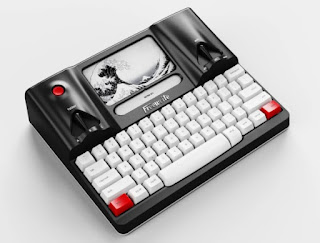
Freewrite Smart Typewriter
https://getfreewrite.com/products/freewrite-smart-typewriter-3rd-gen Well, thanks to this device, my five-year bout of writer's block is...
-
Love is what makes it so hard. But it also makes it so special. It is hard letting go of the things we love. The things which bring us h...
-
 https://getfreewrite.com/products/freewrite-smart-typewriter-3rd-gen Well, thanks to this device, my five-year bout of writer's block is...
 -
I find myself world-building again. It is something I do well, having constructed and entire retro-future past for Paris' world in her b...